

Email marketing is one of the easiest, most powerful, and cost-effective growth channels for small and medium businesses.
Done right, it delivers measurable revenue, strengthens customer relationships, and provides direct access to your audience with highly relevant and personalized content.
So, what does doing it right mean, exactly?
To find out exactly what it takes to succeed at email marketing for small businesses, we consulted the experts behind Omnisend, a leading email marketing platform, and created this step-by-step guide.
Drawing on their wealth of real-world experience, we walk you through how to launch email marketing from scratch, get the fundamentals right, build a strong technical and strategic foundation, and how to optimize performance and scale your program over time.
Whether you are starting for the first time or refining an existing approach, this practical guide will help you make the most of your email marketing!
Email marketing for small businesses is the practice of using email to communicate directly with customers and prospects to promote products or services, build relationships, share updates, and drive sales or engagement.
It relies on permission-based contact lists and focuses on delivering relevant, valuable content to support business goals.
The email audience size is often smaller than that of large enterprises, making segmentation, personalization, and lifecycle management less complex. Therefore, it could be a toss-up between doing it manually and utilizing an email tool.
For small and medium-sized businesses with limited budgets and access to marketing expertise, email marketing is highly cost-effective, with an impressive ROI (up to $42 earned for every $1 spent) and offers numerous benefits.
The key benefits of email marketing for small businesses include:
With the right email marketing software, you can do it in-house, even on a tight budget and with limited time and person-power.
This combination of cost-effectiveness and relationship-building is why email marketing works so well for small and medium-sized businesses across every sector.
Whether you’re just starting out with email marketing or looking to grow and improve your current efforts, having a solid foundation is critical for success.
To establish a solid foundation for your email marketing, you need to:
Here is how to do each of these steps properly:
Before you send a single email, you need clear goals. Without them, you will not know what to measure or improve.
Common goals include generating leads, driving sales, increasing repeat purchases, or improving customer retention.
Next, define which performance indicators you need to track to determine how well your email marketing is performing, and how well it is supporting your overall business goals.
For example, if your goal is to generate new leads, you would track new subscriber growth rate and conversion rates on sign-up forms, whereas if your goal is to increase sales, you’d track click-through-rate (CTR), conversion rate and revenue per campaign or subscriber.
Email works best when it feels relevant. That starts with understanding who you are emailing and what they’re looking for.
According to Omnisend, effective audience targeting usually starts with considering the following key factors:
This helps you identify your ideal customers.
Defining your audience in terms of ideal customer personas is especially important for cold email outreach, but even if you’re only aiming to engage and retain existing customers, knowing exactly who you’re emailing is essential.
Think about their needs, problems, and motivations. What problem can you solve for them?
Consider where they are in their journey with your business.
In general:
Once you know what your goals are and who your audience is, you need to consider the types of emails you will send out, and the tools you will need to do it.
You need a way to manage contacts, create and send emails, and track results.
Depending on your needs, budget, and goals, you can do it manually using your regular email provider, like Outlook or Gmail, or you can use a dedicated email marketing platform or software.
If you have a very small list, only send out occasional emails, and do not plan to expand your email marketing in the short run, you can do it manually using your regular email service provider.
If you choose this route, you will need to:
It’s doable, but the approach quickly becomes time-consuming, difficult manage, and almost impossible to track and measure if you plan to grow your email marketing.
If you have a larger contact list, send out regular emails, and plan to scale your email marketing, you should use a dedicated email marketing platform.
Email marketing software is purpose-built to create, send, and track email campaigns at scale without doing everything manually.
These tools:
Unlike sending emails from Gmail or Outlook, email marketing tools are designed to send marketing emails at scale, stay compliant, and make data easy to understand.
Many platforms also integrate with websites, ecommerce platforms, and CRMs, making it easier to connect email activity to real business results.
The email marketing platform you choose will make a world of difference when it comes to establishing, growing, and optimizing your email marketing.
There are dozens of great tools available, and choosing the right one for your needs comes down to a few key factors.
Here are the most important things to consider when you’re evaluating email platforms:
The best software for your needs is the one that is affordable and that you can grow with and use long-term, ideally with pricing that increases incrementally as your needs expand.
Setting up your email infrastructure correctly is critical for establishing your email sender reputation and deliverability.
Email providers decide whether your messages land in the inbox, spam folder, or get blocked. They do this by evaluating your email sender reputation.
Your reputation is a dynamic score that fluctuates over time and is influenced by factors such as engagement, bounce rates, spam complaints, and sending consistency.
High engagement and clean lists improve trust. Poor practices damage it.
Avoiding Spam Filters
Spam filters look for warning signs. Avoid them by:
Deliverability is not a one-time set-up. It is an ongoing practice that starts with compliance and continues with every email you send.
Start by choosing a professional sender name and email address that match your business domain.
The following best practices will help you get your sender name and address right:
Using a good email marketing platform usually means you don’t need to do this manually, but if you’re doing it yourself, you need to make sure your domain is properly authenticated.
Domain authentication proves that your emails are legitimately sent from your domain. It uses three standard protocols:
Setting these up improves trust, reduces spoofing, and significantly boosts deliverability.
If you are sending marketing emails from a new domain or address, you should not send large volumes immediately. This is known as warming up a domain.
The email warm-up process involves starting with small sends to your most engaged contacts and gradually increasing volume.
This helps build a positive sender reputation and avoids sudden spikes that trigger spam filters.
Modern email marketing platforms automate much of this work. Tools like Omnisend guide you through domain authentication, validate set-up, and help manage warm-up and sending best practices.
Instead of manually configuring DNS records, tracking reputation, and guessing safe send volumes, these platforms provide built-in checks, alerts, and automation.
This reduces errors and makes it easier for small businesses to start email marketing on a strong technical foundation.
Check out this video by Omnisend for a more detailed explanation of email deliverability:
Email marketing comes with legal and technical responsibilities. You must follow regulations, respect subscriber privacy, and protect your ability to reach inboxes.
Failing to do this can lead to spam complaints, blocked emails, or legal issues. Getting it right builds trust and long-term performance.
Key best practices to follow include:
These practices protect your sender reputation and improve deliverability.
You must comply with email laws that govern how you contact subscribers. These vary depending on the region you and your recipients are in and the kind of information you’re sharing.
In the US, CAN-SPAM laws require accurate sender information, clear identification, and easy opt-outs.
In Europe and the UK, GDPR laws require lawful consent, transparency, and respect for user data rights. Other regions have similar regulations.
The safest approach is simple. Only email people who gave explicit permission, clearly explain what they are signing up for, use honest subject lines, and make it easy to opt out at any time.
Once you have all your foundations in place and your email campaigns are active, it’s time to start optimizing for better results and scaling up your efforts by:
Here’s a practical guide to implement these strategies to scale up your email marketing, improve engagement, and increase your conversion rates:
Data tells you what is working and what needs improvement. Start with a small set of core metrics that connect engagement to business outcomes.
Review performance over time and look for patterns, not one-off results.
While you don’t need to track everything, all at once, the more data you have, the easier it is to spot patterns and see what can be improved.
Here are the most important email marketing metrics for small businesses, what they mean, and what to adjust to improve them:
Track trends across multiple campaigns and segments.
Do not optimize metrics in isolation. Look at the whole picture and see what, specifically, needs adjustment.
While a high open rate means little if clicks or conversions are low, knowing that your recipients are getting as far as opening the email helps you understand exactly what and where you need to make adjustments.
Over time, these metrics help you refine subject lines, content, targeting, timing, and frequency to improve both engagement and business results.
Segmentation means dividing your email list into smaller groups so you can send more relevant messages.
Instead of sending the same email to everyone, you tailor content based on who the subscriber is, how they interact with your business, and where they are in your sales funnel.
This improves engagement and conversion rates.
The more precisely relevant your email is to the reader, the more likely they are to take your desired action.
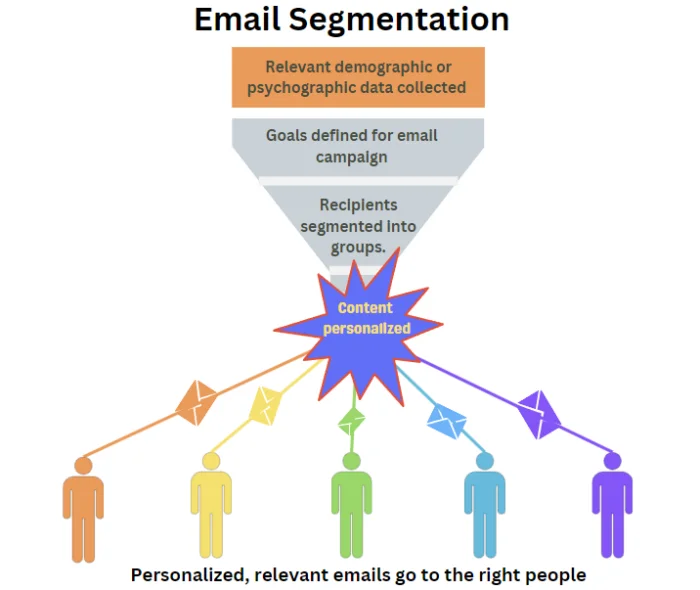
Segmentation enables personalization.
Personalization is more than using a first name. It means matching your message to the subscriber’s context and intent.
Personalized emails:
For example, a new subscriber from a particular lead magnet might need education and trust-building, whereas a repeat customer will respond better to product updates or loyalty offers.
Email platforms store data about your subscribers. This includes how they signed up, what they clicked, what they bought, and how often they engage.
Segmentation uses this data to create rules that automatically group subscribers.
For example, you might create a segment of:
Once a segment is created, you send campaigns or automated sequences only to that group. As subscriber behavior changes, people move in or out of segments automatically.
You do not need complex rules on day one. Start with one or two simple segments and build from there.
Common starting points include:
As your list grows, you can combine rules. For example, active subscribers who bought in the last 90 days.
Start simple, learn from results, and refine over time.
Even basic segmentation can dramatically improve email marketing effectiveness when combined with relevant, personalized content.
Focus on collecting email addresses from people who already interact with your business and from new prospects who show genuine interest.
Your email list should grow through permission, not shortcuts.
Never buy or scrape email lists. They damage trust, hurt deliverability, and can create legal risk.
Here are some of the best ways to build and grow a high-quality email list:
Your existing customers are one of the best sources of subscribers.
You can collect email addresses by:
Always make consent clear.
Customers should understand what they are signing up for and how often they will hear from you, and that they can unsubscribe at any time.
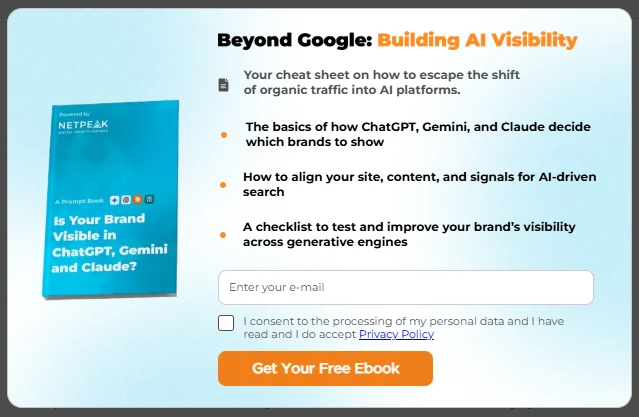
Offering a free lead magnet in exchange for someone’s contact information is one of the best ways to collect email addresses from people actively interested in what you offer.
They give people a reason to voluntarily share their email address, attract potential customers, encourage sign-ups, and start a relationship that can be nurtured over time.
Common lead magnets include:
Lead magnets work best when they solve a specific problem or offer immediate value that matches your audience’s needs and buying stage.
For example, this is a lead magnet from an SEO software company offering a free, downloadable resource to potential clients visiting it’s homepage:
Web forms make it easy for people to sign up for emails from you and allow you to turn website traffic into subscribers.
Place sign-up forms where visitors naturally pause, such as:
Keep forms short and only for the information you actually need.
Fewer fields make it easier for them to sign up much more likely to complete the process without exiting before they submit the form.
Lead finder tools help identify and convert anonymous visitors to your website.
Unlike buying a list of unknown contacts who fit your audience profile, lead finder tools help you contact people who already know you exist, have been to your website, and are actively interested in what you offer.
These tools can reveal business email addresses, enrich contact data, or prompt visitors to subscribe at the right moment.
When using these tools, ensure they comply with privacy regulations and clearly explain how data is collected and used.
Used responsibly, a good lead finder tool can help you grow your list with relevant contacts, without sacrificing trust.
Building your email list the right way takes time, but it creates a higher-quality audience that is more engaged, more responsive, and more likely to become customers.
The design and layout of your emails impact everything from readability to conversion rates.
Design is not about decoration so much as helping readers understand your message and take the next step.
Your emails should be simple, clean, and easy to scan.
Email content should be clear, easy to follow, and prompt the desired outcome.
The key best practices to follow include:
Good email marketing tools make this process easier. Most platforms offer pre-built templates that are easy to customize and optimized for mobile, accessibility, and deliverability.
Using automation allows you to scale up your efforts without scaling up the manual effort involved.
Even with a small team, automation allows you to maintain regular contact, provide value, and drive sales without manually sending every email.
By combining triggered sequences with dynamic content, you deliver highly relevant, personalized messages that improve engagement and revenue while saving time.
How triggered email sequences work:
Triggered emails are sent automatically when a subscriber takes a specific action. For example:
Triggers can be based on actions (clicks, purchases, form submissions), dates (birthdays, subscription anniversaries), or engagement patterns.
This ensures messaging is timely, relevant, and increases the likelihood of conversion.
“Based on Omnisend’s internal data for Q1–Q3 2025, automated emails generated nearly 40% of all email-attributed revenue while accounting for roughly 3% of total send volume. The largest share of automated orders continues to come from three high-intent flows — abandoned cart, welcome, and browse abandonment — underscoring that timely, behavior-based messaging consistently outperforms one-off campaigns.”
You can take triggered emails a step further by introducing dynamic content blocks.
Dynamic content blocks allow you to personalize specific sections within an email for different subscribers within the same campaign.
For example:
Dynamic blocks increase relevance for each recipient and reduce the need to send multiple versions of the same campaign to different segments of your email list.
Here is an example from Omnisend of an email using dynamic content tailored to the recipient’s gender:
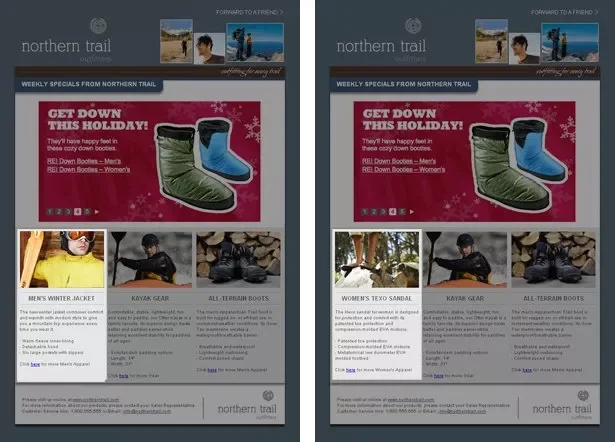
Relevance is everything when it comes to successful email marketing.
Every email should offer something of value that is highly relevant to the recipient.
There are many different types of marketing emails, each serving a different purpose and supporting a different stage of the customer journey.
Using a mix of these email types for different scenarios ensures that you stay relevant, support the full customer lifecycle, and avoid overwhelming subscribers with constant promotions or irrelevant offers.
Start with core email types such as welcome emails, newsletters, promotions, and post-purchase messages, and then expand from there.
A/B testing (or split testing) is the process of sending two different versions of an email to a small portion of your list to see which performs better.
After the test, the winning version is sent to the remainder of your audience.
Steps to run an A/B test:
Testing one element at a time ensures you know exactly what caused any performance difference.
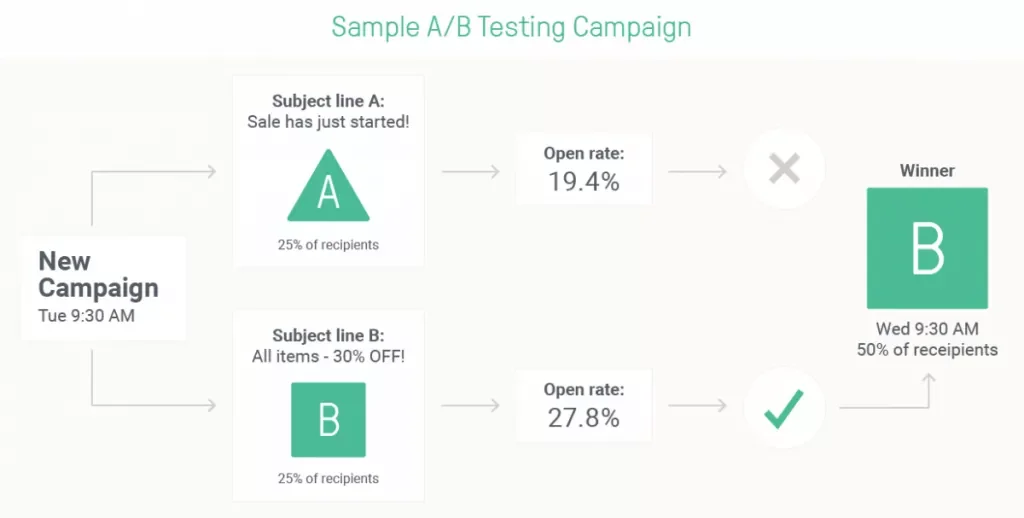
What to Split Test:
The most common elements to test include:
How to Optimize Based on Split Test Results:
Track performance trends over multiple campaigns. Use data to identify what resonates with your audience and apply it to future emails. For example:
By continuously testing and iterating, you create a feedback loop that improves relevance, engagement, and conversions over time.
A structured approach to testing ensures you make informed, data-driven decisions rather than relying on guesswork.
Over time, lists naturally accumulate inactive or invalid addresses. List cleaning is the process of removing or managing contacts who are inactive, invalid, or at risk of hurting your sender reputation.
This includes:
A clean list improves engagement metrics like open rates, click-through rates, and conversions. It also protects your sender reputation, which affects deliverability.
Sending to uninterested or invalid contacts can trigger spam filters and reduce the chances your emails reach active subscribers.
Sending emails to inactive or unengaged subscribers also costs money and reduces the overall ROI of your email marketing.
Best practices for maintaining a healthy email list:
What counts as an unengaged subscriber?
Omnisend recommends what they call ‘sunsetting’ subscribers who haven’t engaged in 120+ days by sending them a re-engagement email.
If still don’t engage, you let them go and clear them off your list.
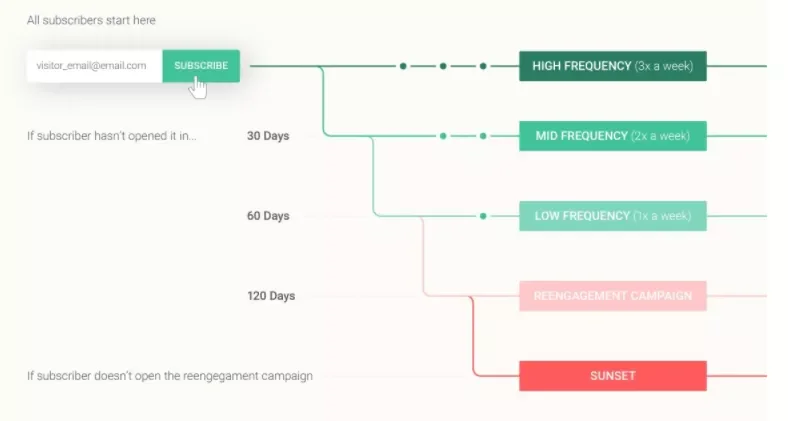
Regular list maintenance ensures you are emailing fewer, but more engaged, subscribers. This approach maximizes the impact of every send and keeps your email program sustainable over time.
For emails that are not triggered by a specific action, like newsletters or promotions, consistency matters more than volume.
Before you send anything, decide how often you can realistically deliver high-quality, relevant emails.
Prioritize value over cadence. Never send an email just to “stick to the schedule.” Every message should have a clear purpose and benefit for the reader. If you do not have something useful, relevant, or timely to say, it is better to wait.
Your goal is to stay visible without becoming intrusive, and to always provide something of real value rather than a repetitive reminder or reiteration of your last email.
Subscribers stay engaged when emails consistently help them, inform them, or reward them. Cadence supports this goal, but it should not drive it.
Create a simple content calendar to plan ahead and have your content ready to go out as planned, without having to throw something together at the last minute.
Best-practice frequency for non-triggered emails:
For most small and medium businesses, one to two non-triggered emails per week is a safe starting point.
This includes newsletters, announcements, and promotions sent to broad segments. Sending less often can reduce brand recall. Sending more often increases the risk of unsubscribes and fatigue.
There is no universal rule. The right frequency depends on your audience, your industry, and how much genuine value you can deliver.
Your send frequency should evolve based on performance. Monitor key engagement signals such as open rates, click rates, unsubscribe rates, and spam complaints.
If engagement drops or unsubscribes rise, reduce frequency or tighten targeting. If engagement is strong and consistent, you may be able to test sending slightly more often to your most engaged segments.
Let data, not assumptions, guide changes to your cadence.
For small and medium businesses, email marketing success does not require complexity at the start. It requires clarity: clear goals, a clean and permission-based list, consistent value-driven content, proper technical set-up, and ongoing measurement.
From there, testing, segmentation, and automation allow you to refine performance and scale intelligently.
The businesses that see the strongest results treat email marketing as a system, not a one-off campaign. They monitor performance, protect deliverability, personalize communication, and continuously optimize based on data.
With the right foundation and the right tools, supported by expert best practices, you can move from simply “sending emails” to building a high-performing email program that grows with your business.
Start simple. Get the fundamentals right. Then optimize, automate, and scale with confidence!
Yes. Email consistently delivers one of the highest returns on investment of any marketing channel. It gives you direct access to your audience and drives repeat sales without ongoing ad spend. Using the right software, you can manage and scale your email marketing in-house, making it cost-effective for smaller, growing businesses.
Most small businesses start with one email per week or biweekly. Consistency matters more than volume. Frequency should depend on the value you can provide and your audience’s engagement levels. Read the full guide to learn more about the optimal send frequency for email marketing.
You need email marketing software to send campaigns at scale, automate messages, track performance, and stay compliant. Gmail and Outlook are not designed for marketing emails and can harm deliverability. It is also a huge amount of time-consuming work to manage email campaigns manually. Read the full guide to learn more about what email marketing involves and how to determine which tools you need.
Start with a welcome email, a simple newsletter, and a promotional campaign. Then add automated flows such as abandoned cart emails or post-purchase follow-ups. Read the full guide to learn more about the different types of marketing emails, when to use them, and how to leverage email automation and triggered email sequences.
Use website signup forms, offer lead magnets (like discounts or guides), collect emails at checkout, and ask existing customers for permission to stay in touch. The important thing is to ask permission, be clear about what you will use their contact details for, and always give them an easy way to un-subscribe.
Neil Patel: Email Segmentation: Why it Matters and Effective Tactics
Woorise: Email Marketing A/B Testing: Examples, Ideas & Tips

In a world where instant messaging has become the norm, WhatsApp is the most popular with more than ...

The challenge many email marketers face for successful cold email marketing campaigns is optimizing ...

Cold email campaigns are tricky at the best of times, and most cold emails hardly make a dent. With ...

Enroll in our free 5-lesson email course today!
Free for limited time only.