

Google Local Services Ads (LSAs) are one of the most effective ways for local, service-based businesses and professional services to generate high-intent leads directly from Google Search.
Unlike traditional Google Ads, LSAs appear at the very top of the search results and charge you per lead, not per click.
This guide explains exactly how to set up Google Local Services Ads step by step, even if you’ve never used Google Ads before.
We’ll cover what LSAs are, how they work, average cost per lead, eligibility, verification, setup, budgeting, what to do after your ads go live, and how to optimize for better results.
Let’s jump right in!
Google Local Services Ads are pay-per-lead ads designed for local service businesses like plumbers and electricians, and local professional services like real estate agents and lawyers, operating within a specific geographical area.
Local Services Ads typically show:
They appear at the very top of the page, above standard Google Ads and organic results, and allow customers to call or message your business directly from the search results.
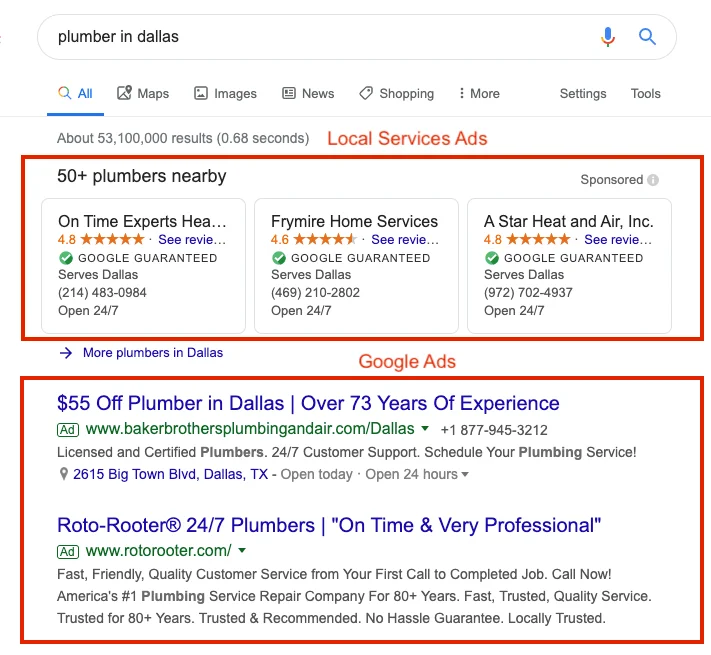
Unlike traditional Google Ads, where you pay per click, you only pay for Google Local Service Ads when someone calls or messages you directly from your ad.
These ads also display a built-in Google Verified trust badge from Google, which is replacing the Google Guaranteed and Google Screened badges that we used to see on LSAs.
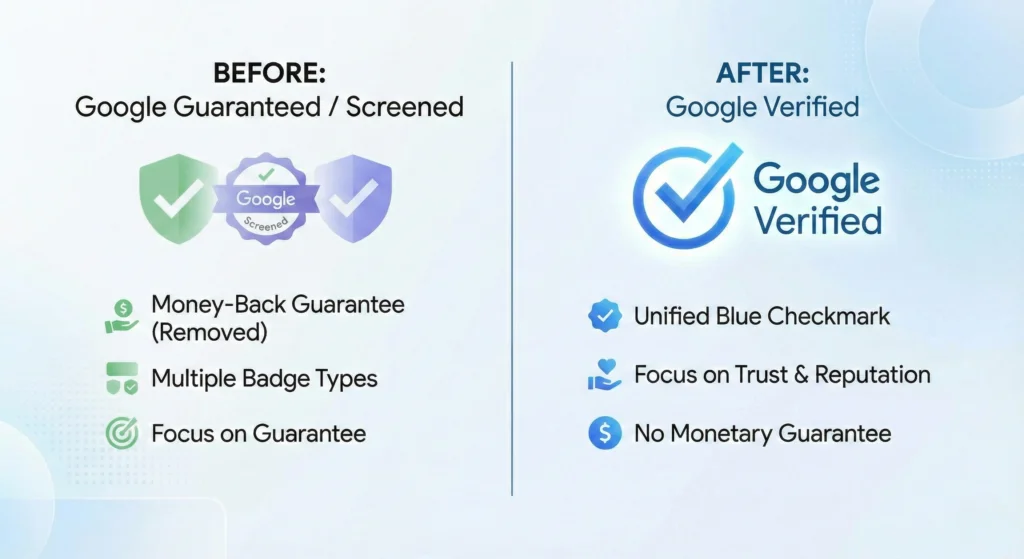
The Google Verified badge signifies that your business meets Google’s Local Service Ad requirements and has passed the screening, licensing, and background check process.
It is an important trust signal for potential customers, improving click and conversion rates.
The biggest difference between Local Service Ads and traditional Google Search Ads is that LSAs are only for in-person home and professional services, located within a defined geographical area.
The key differences between LSAs and Google Search Ads is that LSAs are:
Check out this video by Advirtis for a more detailed breakdown of the difference between Local Services Ads and Google Search Ads, and when LSAs are most effective:
If your business is eligible, you can significantly benefit from using LSAs. However, there are some disadvantages to consider too:
Pros:
Cons:
A business is eligible to use LSAs if it meets Google’s category, location, and trust requirements and can pass the screening and verification process.
To do this, a business must meet the eligibility requirements, which are broken down as follows:
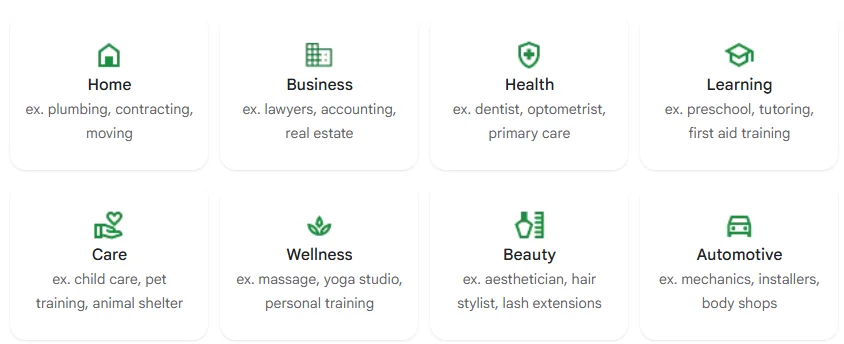
LSAs are only available for specific service-based industries, including:
Available categories vary by country and region. If your category isn’t listed during signup, you cannot run LSAs.
Your business must:
LSAs are not available for:
To be eligible for LSAs, you need to have a Google Business Profile with the correct business name, address, and phone number, and verified ownership.
Verification requirements vary by industry but commonly include:
You cannot run LSAs until all required checks are approved.
Google expects businesses to:
Poor responsiveness can make your ads ineligible or limit visibility.
Your business must:
QUICK GOOGLE LSA ELIGIBILITY CHECKLIST
A business is eligible for Google Local Services Ads if it:
Eligible businesses must meet the following requirements to run LSAs and pass Google’s LSA verification process:
Depending on your industry and location, Google may require:
Your business name must exactly match the name on your official documents.
Many categories require background checks for:
Background checks are handled by Google’s verification partner and are mandatory.
LSA verification typically takes 2 days to 3 weeks, depending on the category.
Google Local Services Ads use a pay-per-lead pricing model, which means you are only charged when a customer calls or messages your business through the ad.
You are not charged for impressions or clicks.
The typical cost-per-lead for Google Local Services Ads varies considerably by industry, competition, and location.
Most service categories cost roughly $15 – $100 per lead, depending on the industry and competition.
Home service industries, such as plumbing, HVAC, and electrical, typically range from $20 to $80 per lead.
For example, the average CPL for plumbing is around $20 to $75, $25 to $80 for HVAC, and $35 to $70 for electrical services.
Costs are also influenced by:
Lower-competition niches, such as appliance repairs, handyman services, or carpet and gutter cleaning, typically range from $5 to $30+ per lead.
Highly competitive or high-value services, like legal or specialized trades (e.g., plumbing, roofing, electrical, and HVAC) can exceed $100+ per lead in big metro areas.
These figures may seem daunting, especially for small businesses, but part of the process is to enter a weekly budget for your ads.
Google suggests a weekly budget and estimates how many leads that budget will generate. You can then adjust it up or down as you go.
SUMMARY: AVERAGE GOOGLE LOCAL SERVICES AD COST PER LEAD
Google Local Services Ads typically cost between about $15 and $100+ per lead, with most local service businesses paying in the $25–$80 range, depending on the industry and market competition. To keep costs manageable, you can set a fixed weekly budget and adjust it over time.
Here is a simple, step-by-step guide that runs through the whole process, from checking if your business is eligible to what to do after your ads go live:
Go to the Google Local Services Ads page and click “Get started.”
You’ll be asked to:
Google will immediately tell you whether your business is eligible.
If your category is not listed, you cannot run LSAs.
You need to sign in using a Gmail account that your business owns (not your personal account) or a Google Workspace business email.
If you don’t already have one, you need to create one first.
You do not need a Google Ads account to start.
It’s important that your business information is accurate, up to date, complete, and consistent.
You’ll be asked to provide:
Your phone number must:
Make sure the information you provide is consistent with your Google Business Profile and legal paperwork.
Inconsistent information is the most common cause of delays.
Google provides a predefined list of services for your category. It’s important that you enter these accurately, using the following best practices:
Selecting the Correct Services:
Defining Your Service Area:
You can define your service area by:
Start with areas you can realistically serve.
Expanding too far out can lead to poor-quality leads and higher costs if people enquire (costing you a paid-for lead) but end up using a more conveniently located competitor.
Your ads will only appear during the hours you list, but it’s important to list the hours you work accurately (don’t extend them for more ad time).
Missed calls and delayed message responses will negatively affect your ad ranking, so only include the hours when:
To complete the LSA verification process, you must upload all the required documents directly to the Local Services dashboard.
The documents required for verification will likely include:
You’ll receive email updates as each step is approved.
Wait until verification is complete (usually between days and two weeks) before you start working on ads or trying to optimize them.
A Google Business Profile is required for Local Services Ads. Before you link to it, make sure that:
Reviews from your Google Business Profile are displayed in your ads, providing valuable social proof to increase trust and credibility for your business.
Setting the weekly budget for Google Local Services Ads is one of the most important (and most frequently misunderstood) parts of running LSAs.
How LSA weekly budgets work:
Google may slightly exceed your weekly budget in a given week, but it will average out over time.
However, unlike Google Search Ads, budget decisions here directly affect lead volume, visibility, and ranking.
Google uses your weekly budget to determine:
While budget does affect ranking (how high up your ads appear in relation to competing LSAs), ranking is also based on:
In short, setting a higher budget increases the number of opportunities you get but does not guarantee top placement.
A simple, safe way to determine your initial weekly budget is to estimate your acceptable cost per lead and then multiply by the number of leads you can realistically handle in a week.
For example, if you’re comfortable paying $40 per lead and can handle 10 leads per week, you can start with a $400 weekly budget.
That gives you a ball park figure to base your decisions on.
Google offers a useful budget estimator tool, where you enter your location, industry and the number of leads you want per month. That will provide you a good estimate of how your CPL to inform your decisions.
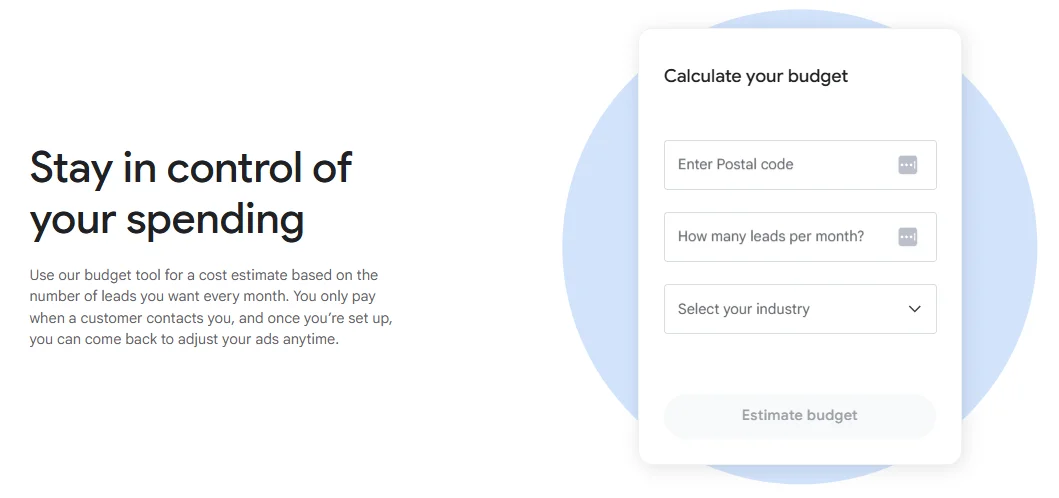
Once you’re signed up for LSAs and you enter your LSA budget, Google will then give you an estimate of the number of leads you can get for that amount.
Use this to adjust the amount, aiming for a balance between CPL and the number of leads you can realistically handle in one week.
How high you set your budget can be as simple as knowing what you can afford/how many leads you can safely handle and sticking to that.
However, if you have more wiggle room and you’re wondering if it’s better to set it higher or lower, here are some things to consider:
Setting your budget too high too early on can:
LSAs punish missed calls more than low spend.
However, a budget that’s too low can limit visibility and:
You want enough budget to test and refine, without exceeding your capacity and sacrificing customer experience and conversions.
If you’re unsure, start with Google’s recommended budget and adjust later!
A good rule of thumb for increasing your LSA budget is to increase it in small increments (10-15%), waiting at least a full week (preferably two) between increases.
You should only increase your weekly budget when:
This will help you optimize your return on ad spend (ROAS), improve trust signals and ad ranking, and increase your conversion rate.
The final step in the process is to simply turn your ads on!
Ads are usually live within a few hours, or they can start showing immediately.
Once your ads are live, they will appear for relevant searches in your area, and people can call or message you directly from the ad.
The leads from Google Local Services Ads are delivered as calls or messages (if you have enabled the messaging feature).
Calls are recorded for quality control and dispute purposes.
You can dispute leads when a call or message is from outside of your service area, for services you don’t offer, or is a spam or job query.
The higher your ad appears in the search results, relative to competing LSAs, the more leads you’re likely to get.
The key factors influencing LSA ad ranking are your review score and how many reviews you have, how responsive you are to calls and messages, and your proximity to the searcher’s location.
Your ad position is also influenced by your budget, business hours (if you’re open when the search is made, you’re more likely to rank higher at that time), and past lead quality and performance.
Google prioritizes businesses that deliver a good customer experience. Once your Google Local Services Ads are live, performance is driven less by budget and more by trust and responsiveness.
The following tips and best practices will help you build trust and optimize your ads to improve LSA performance:
Google tracks how often and how quickly you respond to leads. Missed calls or slow responses directly reduce visibility.
Best practices:
Reviews are one of the most important ranking factors for Local Services Ads.
Optimize by:
Google only awards the Google Verified badge after you successfully complete its verification process, which ensures your business is trustworthy and meets regional requirements.
Once you earn the badge, keeping it requires ongoing compliance and attention to detail.
Best Practices to Maintain Your Google Verified Status:
Selecting too many services or overly large service areas often leads to low-quality leads.
Optimization tip:
Not every lead is billable. Google allows you to dispute invalid leads directly in the dashboard.
You can dispute leads that are:
Consistently reviewing leads helps protect ROI and improve future performance.
Increasing the budget before your ads are performing well usually increases waste, not volume.
Best practice: Only increase your budget when:
In Summary: How to Improve Your Google Local Services Ad Performance
The businesses that win with Google Local Services Ads aren’t the ones that spend the most; they’re the ones that respond quickly, earn strong reviews, actively maintain their Google Verified status, and keep their setup tightly aligned with what they actually offer.
If your business depends on local customers actively searching for services, Google Local Services Ads can be one of the most effective lead generation channels available!
Once they’re properly configured and managed, LSAs often become a primary source of inbound leads for local service businesses.
In this guide, we have set out exactly how to run LSAs from start to finish (and ongoing optimization), and you’re all ready to get started!
Google Local Services Ads are pay-per-lead ads that help local service businesses and professional services appear at the top of Google search results and receive calls or messages directly from potential customers. Check out the full guide to learn more about LSAs, how they work, how much they cost, and how to run LSAs for your business.
Google matches local, high-intent searches to your selected services and service areas. LSAs use a pay-per-lead pricing model, so you only pay when a customer contacts your business through a call or message generated by the ad. Check out the full guide to learn more about how LSAs work, who they’re for, and how much they cost.
For many local service businesses, LSAs deliver higher-quality leads at a lower risk than pay-per-click ads, because you only pay for real inquiries. Read the full guide to learn more about LSAs and whether they’re a good fit for your business.
Verification typically takes 2 days to 3 weeks, depending on industry and background check requirements. Read the full guide to learn more about Google Local Service Ads eligibility, requirements, and verification.
No. A website is not required, but having one can improve trust and conversion rates. However, a Google Business Profile is mandatory for LSAs. Check out the full guide to learn more about the requirements for Google Local Service Ads.
Costs vary by industry and location. You pay per valid lead, not per click, and set a weekly budget that controls how many leads Google attempts to deliver. Check out the full guide for more on how much LSAs cost, average cost per lead, and factors that influence how you will pay for each lead, and how to choose the right weekly budget for your ads.
Common reasons include incomplete verification, low budget, poor responsiveness, limited service areas, or strong competition in your location. Check out the full guide to learn about LSA optimization, how to improve performance, and the best practices to follow.
Yes. You can dispute leads that are spam, outside your service area, for services you don’t offer, or unrelated to your business. Disputes are logged directly in your Local Services dashboard.
High review ratings, fast response times, accurate service selection, proximity to the searcher, and consistent lead handling all improve visibility and ranking. Check out the full guide to learn how Google ranks LSAs and how to optimize for better performance.
Google: Google Local Services Ads (Official Overview)
Google: Google Local Services Ads (Eligibility & Signup)
Google: Google Local Service Ads Platform Policies
Ikai Media: The Google Verification Badge: How to Use the New Blue Checkmark to Build Trust
Synup: Understanding Google Local Services Ads & Verification Badge

Ad banners are popular for businesses because they offer so much potential! There are various sizes ...

Paid media is a marketing practice businesses can't afford to ignore. However, developing and mainta...

Choosing the right Meta ads agency can be the difference between wasted spend and scalable, predicta...

Enroll in our free 5-lesson email course today!
Free for limited time only.