

When you’re advertising on Amazon, your ACOS (Advertising Cost of Sales) number measures the efficiency of your ad campaign.
In many ways, it serves as the reality check for your entire Amazon PPC strategy, telling you whether your ad spend is working or just burning through your budget without generating a real profit.
Get it wrong, and you’ll be paying more in ads than you make in profit on your sales; get it right, and your ads become a profitable growth machine.
In this guide, we break down everything you need to know about Amazon ACOS, including how to calculate it and how to improve it.
Whether you’re struggling with high ACOS or want to optimize your Amazon campaigns, this guide has practical ways to reduce costs and increase your return on Amazon ad spend!
Amazon ACoS (Advertising Cost of Sales) is a core efficiency metric for Amazon ads. ACoS shows the ratio of ad spend to ad-driven sales, which shows you how much you spent on ads to generate a given amount of revenue.
ACoS is calculated by dividing ad spend by ad-driven sales, then multiplying by 100 to get a percentage total.
Amazon ACOS Formula: Ad Spend ÷ Ad Revenue × 100 = ACOS (%)
So, if you spent $100 on Amazon ads and those ads generated $500 in sales, your ACoS would be 20%.
It’s essential to know what your Amazon ACOS is so that you can assess ad performance, profitability, and allocate your ad budget wisely.
ACOS is used to measure advertising efficiency. In general, the lower your ACOS is, the smaller the cost of your ads in relation to the revenue they generate.
However, just how ‘good’ Amazon ACOS is depends entirely on what your goals and acceptable profit margins are.
Watch: Luca Davenport’s TOP 5 Amazon PPC Tips & Tricks To Increase Sales & Reduce ACOS
At its core, calculating Amazon ACOS is about isolating the direct correlation between what you spend on Amazon ads and the revenue those ads generate, specifically.
It is calculated by dividing ad spend by ad-driven sales, then multiplying by 100 to get a percentage total.
Amazon ACOS Formula: Ad Spend ÷ Ad Revenue × 100 = ACOS (%)
For example, if you spent $100 on Amazon ads and clicks from those ads generated $500 in sales, your ACOS calculation would be: $100 Ad Spend ÷ $500 Ad Revenue × 100 = 20% ACOS.
The ACOS calculation uses ad-attributed revenue only, which Amazon directly attributes to a customer clicking on one of your ads and then making a purchase.
Amazon tracks this automatically in Seller Central, attributing sales to a given ad click within a defined window (typically 7 days for Sponsored Products), and you can see it on the account level, campaign level, Ad group level, or keyword level.
For your ACOS to be meaningful, it needs to be understood in relation to your profit margin, which means you need to work out your break-even ACOS percentage, and identify a target ACOS percentage to aim for.
Your break-even ACOS is the point at which your ad spend is equal to your profit on the product.
At break-even, you’ve made a sale but the cost of the ad cancels out the profit on the product, and you’re not making any money on that sale.
Break-even ACOS Formula: (Sale Price – Cost of Goods Sold – Amazon Fees) ÷ Sale Price = Break-even ACOS (%)
Here’s a quick example:
If your product sells for $50, your cost of goods sold is $15, and Amazon fees come to $10. That leaves you with $25 in pre-ad profit. Your break-even ACOS is then $25 ÷ $50 = 50%.
A 50% ACOS is then the point at which you will start either making or losing money.
If your ACOS is:
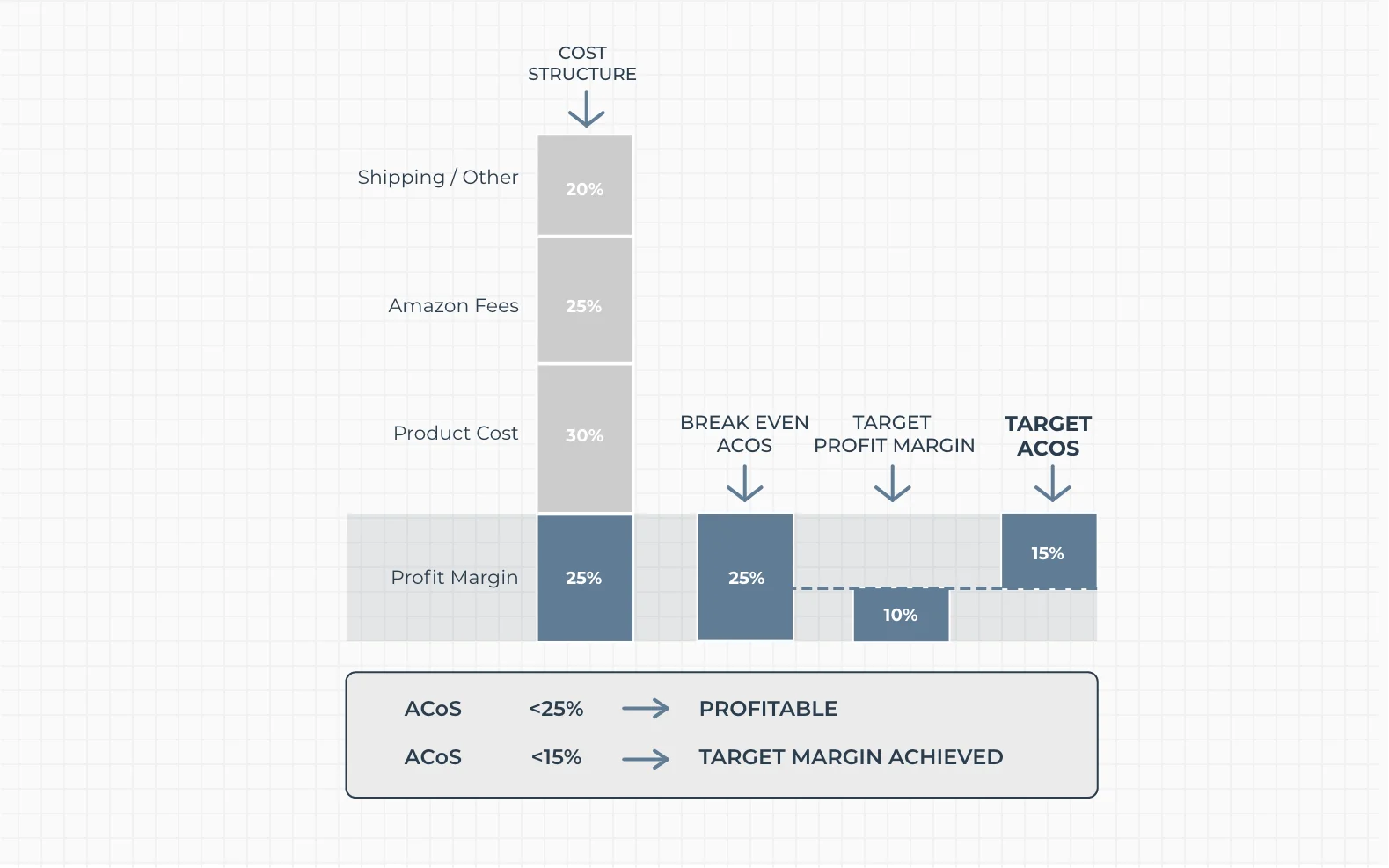
Once you know what your break-even ACOS pointl is, you can determine your target ACOS.
Your target Amazon ACOS is the ACOS level you aim to achieve in order to meet a specific business goal, such as profitability, breakeven, or controlled growth.
It is not a fixed benchmark so much as a strategic control point you set based on your margins and objectives.
You can adjust your target ACOS depending on what you are trying to achieve:
Your target ACOS also becomes a control signal for optimization and you can use to inform ad campaign decisions.
You can use it to:
Your target ACOS is not universal. It is a benchmark you set based on your margins and strategy.
There’s no single number that defines a ‘good’ ACOS benchmark for every seller.
Your goal and target largely define what a ‘good’ ACOS is for you.
For example, if you’re launching a product and trying to gain reviews and rank fast, you might intentionally run at a higher ACOS for the first 60–90 days. Once you’ve got some organic traction, you can tighten it up.
It depends on your profit margin, your goals, your product category, and where you are in the business growth.
A ‘good’ target ACOS is simply the one that aligns your advertising spend with your business objective.
That said, the median ACOS across sellers on Amazon typically ranges from 25-30%, which is a loose industry standard or baseline of sorts, and you can you can consider the following as a rough guide:
The most important benchmark of all is an ACOS that goes beyond your own break-even point and stays there if your goal is sustained profitability.
TDLR: Amazon ACOS (Advertising Cost of Sales)
Amazon ACOS (Advertising Cost of Sales) is the amount you spend on ads compared to the revenue generated by those ads. Think of it as a key Amazon PPC performance metric. This includes costs from Sponsored Products, Sponsored Brands, and Sponsored Display ads, and it’s all tracked directly in Seller Central at different campaign levels. ACOS matters because it shows whether your campaigns are profitable and helps guide bid and keyword decisions. If your ACOS is greater than your profit margin, then you’re losing money on each sale.
The Difference Between ACOS and ROAS is that ROAS (Return on Ad Spend) measures how much revenue you earn for every dollar you spend on advertising, whereas ACOS measures the percentage of your total revenue spent on advertising.
They both measure the relationship between ad spend and revenue, but they do it in different ways:
Both ACOS and ROAS are useful, and many experienced Amazon sellers track both.
ACOS is more intuitive for comparing against your profit margin directly, while ROAS is more commonly used when reporting overall paid ad campaign performance.
TACOS (Total Advertising Cost of Sales) is a key performance metric in Amazon advertising that measures your total ad spend relative to your total revenue, not just ad-attributed sales.
You calculate TACOS by dividing your total ad spend by your total revenue (including both organic and paid sales), then multiplying by 100.
TACOS Formula: (Total Ad Spend ÷ Total Revenue) × 100 = TACOS (%)
For example, if you spend $100 on ads and generate $1,000 in total sales, your TACOS is 10%.
TACOS shows how dependent your business is on advertising. Unlike ACOS, which only measures efficiency within ad-driven sales, TACOS reflects the broader impact of ads on your entire business.
A lower TACOS generally indicates that your organic sales are growing faster than your ad spend.
You use TACOS to understand long-term performance.
If TACOS is decreasing over time, it often means your ads are helping drive organic visibility and brand strength. If TACOS is rising, it can indicate increasing reliance on paid traffic to maintain revenue.
TACOS is especially useful for tracking product launches and scaling phases. In early stages, TACOS is often high because most sales come from ads.
As ranking improves, organic sales should increase, and TACOS should decline.

If you want the full picture of how advertising is affecting your Amazon business, TACOS is the metric to watch alongside ACOS.
Your keyword targeting affects ACOS more than anything else. Broad, non-specific keywords will attract nothing but browsers who aren’t ready to buy.
When you target specific long-tail keywords, you are targeting people who already know what they want and are ready to buy.
For example, someone searching for “running shoes” is not ready to buy. Someone searching for “women’s waterproof trail running shoes size 8” is definitely ready to convert.
Long-tail keywords also tend to have lower cost-per-click (CPC), which lowers your ACOS.
Use your Automatic campaigns as a research tool. Run them at conservative bids to find out which search terms are converting.
Then take your best-performing terms and move them into manual campaigns with Exact match targeting, where you have full control over bids.
While you are at it, build out your negative keyword list. Check back on the Search Term Report in your Amazon Ads console and add in any irrelevant search terms that aren’t converting but eat through the budget.
Amazon’s own guidance recommends including at least 25 keywords across your campaigns, using a mix of phrase, broad, and exact match types.
Check out this video by SellerMetrics to learn more about Amazon PPC Search Term Report analysis:
If people click on your ad and don’t end up buying, you’re throwing money away by losing a conversion opportunity.
Amazon’s algorithm will also raise your CPC bid and lower your ad placement for poorly converting listings.
To improve your Amazon listing:
Remember that a 5% increase in your conversion rate can make your ACOS drop without making any changes to your bid.
Optimizing your bids on Amazon can be tricky. If you bid too high, you’ll inflate your ACOS, and if you bid too low, you’ll limit ad visibility and therefore sales.
The goal is to find the sweet spot that keeps your ACOS in check but also maintains traffic.
So, start by evaluating keyword-level performance within your campaigns. If there are keywords that convert well and have an ACOS below your target, consider increasing bids to gain more of this profitable traffic.
On the flip side, if a keyword has a high ACOS and doesn’t convert, lower the bid or add it as a negative.
Be strategic with Amazon’s dynamic bidding features. “Down only” bidding automatically lowers your bid when Amazon predicts a relatively low chance of conversion.
With “up and down,” Amazon can raise bids slightly (not over your max) if they predict a relatively high chance of conversion. Test these features on different campaign types to balance efficiency and volume.
Not all hours of the day or days of the week perform equally. If you can identify when your ads convert best and when they don’t, you can shift your budget toward high-performing windows and reduce spend during low-performing ones.
Amazon doesn’t support dayparting natively, but third-party PPC management platforms can help you with scheduling bid adjustments or even pausing your campaigns at certain times. Start by looking at your campaign data on a day-of-the-week basis.
If there are specific days that never perform well, consider reducing your budget or bids during that time to decrease wasted spend and improve overall ACOS.
On Amazon, customers usually buy from a single featured offer on a product page. This is called the ‘Buy Box’. If your offer is not selected for the Buy Box, your ads will not show for that product.
This means losing the Buy Box stops your ads from running, even if your campaign is active. It also reduces your overall sales and limits how quickly you can improve performance.
Amazon chooses the Buy Box based on several factors. Price is important, but it is not the only factor. Your seller performance also matters. This includes your order defect rate, late shipment rate, and overall account health. Faster and more reliable fulfillment improves your chances, which is why using FBA often helps.
To improve your Buy Box win rate, keep your pricing competitive, maintain strong operational metrics, and use fast, reliable fulfillment where possible. The more consistently you win the Buy Box, the more consistently your ads will run. This leads to more stable data, faster optimization, and ultimately lower ACOS over time.
In Summary:
Narrow your keyword targeting by focusing on high-intent, long-tail keywords and cut waste with negative keywords. Improve your product listings to boost conversions since better conversion rates naturally reduce ACOS. Adjust bids carefully by scaling what works and reducing spend on underperforming keywords. Don’t forget to secure the Buy Box consistently since your Amazon ads only run when you have it.
Amazon ACOS is the easiest metric you can track to know if your advertising is profitable or not. Knowing how to calculate it, what’s a good target for your specific case, and what levers you can pull to improve it puts you in control of your ad spend.
The key takeaways: always anchor your target ACOS to your own break-even point, use TACOS alongside ACOS to know how your business performs, and never treat keyword optimization and listing quality as a one-time task.
Keep in mind that small, consistent improvements across the board compound over time into significantly better Amazon campaign performance.
ACoS stands for Advertising Cost of Sales, and is a metric provided by Amazon to help gauge the efficiency of your PPC Ads. It shows the percentage of ad-driven sales you’re spending on ads. The lower it is, the more efficiently your ads are functioning compared to the sales revenue.
A good ACOS varies based on your profit margins and goals. Typically, 15–25% is considered efficient for mature products, while 25–40% can be okay for highly competitive categories or if you’re in an aggressive growth stage. The best benchmark is your break-even ACOS, which is equal to the profit margin of your product before advertising costs are factored in.
ACOS measures ad spend against revenue generated directly from Ads. TACOS measures Ad spend against your total store revenue, including organic sales. TACOS gives a broader view of how advertising impacts your overall business. A declining TACOS over time signals that your PPC campaigns are building organic sales velocity, which is a healthy sign.
Not necessarily. First of all, you need to look at the goal of this campaign. Usually, brand awareness or new product launch campaigns run with a higher ACOS, on purpose. If you still want to pause it, add negative keywords to cut wasted spend, reduce bids on specific underperforming terms, and check if your listing's conversion rate is the root cause.
SellerEngine: PPC Campaigns That Work: Strategies to Reduce ACOS and Boost Sales
Statista: Median Amazon Sponsored Ads ACOS (United States, by type, 2022)
Amazon: Amazon selling stats
FeedVisor: Amazon ACOS: How to Calculate, Benchmark, and Lower Your Ad Cost of Sales
Amazon Ads: What is the Advertising Cost of Sales (ACOS)? Everything You Should Know
Nova Data: Amazon Seller Statistics 2026: 70+ Data Points for Sellers, Researchers, and Agencies

Securing e-commerce sales is challenging for most businesses. The best way to maximize your chances ...

E-commerce marketing automation tools are the answer to optimizing efficiency, customer engagement a...

In the world of e-commerce, where digital efficiency is king, Shopify marketing automation has emerg...

Enroll in our free 5-lesson email course today!
Free for limited time only.